
Estimates
Auto repair estimates on mobile or web, sent as a PDF
Add labour and parts, let AutoViko do the math, and send the customer a professional PDF estimate while you are still standing next to the car.
10-day free trial, then $9.99/month. Cancel anytime.
Quote the job without a calculator
Add labour by hours and rate, and parts by quantity and price. AutoViko adds it up, works out the sales tax and shows the total as you go, so there are no math mistakes on the paper the customer signs off on.
When it looks right, send the estimate as a PDF with your shop details by email, text or any app on your phone. The customer sees exactly what they are paying for.
- Labour hours × rate, parts × quantity
- Sales tax calculated for you
- Send as PDF by email, text or any app
- One tap turns it into an invoice later
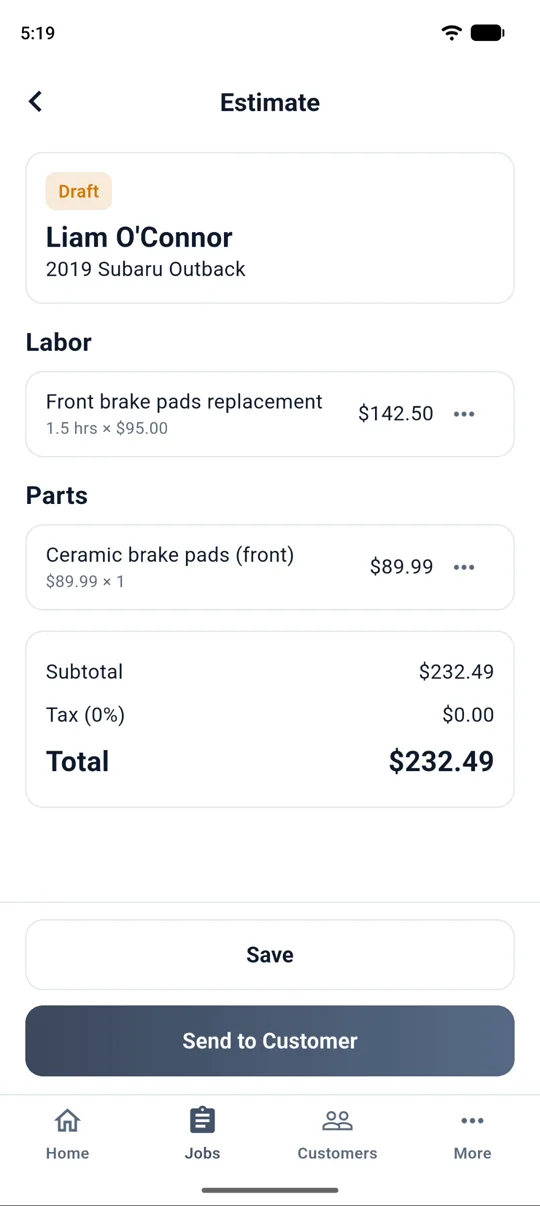
How to write an estimate in AutoViko
- 1
Add labour
Describe the work and enter the hours and your rate. Add as many labour lines as the job needs.
- 2
Add parts
Enter each part with quantity and price. Subtotal, tax and total update straight away.
- 3
Send it
Share the PDF by email or any app. When the work is done, the same estimate becomes the invoice.
Why a clear estimate matters
Faster yes
A clean, itemised PDF is easier for the customer to approve than a number on a scrap of paper.
No math mistakes
Totals and tax are calculated for you, line by line.
No retyping
The estimate becomes the invoice, so you never enter the same parts twice.
Questions
- Does AutoViko calculate sales tax on estimates?
- Yes. Add your labour and parts and AutoViko works out the subtotal, sales tax and total for you.
- How do I send an estimate to a customer?
- AutoViko creates a PDF estimate with your shop details. Email it from the app or share it through any app on your phone, such as text messaging.
- Can I turn an estimate into an invoice?
- Yes. When the work is done, one tap turns the estimate into an invoice, with the same labour and parts.
Related features
Try AutoViko free for 10 days
Every feature included. $9.99/month after the trial, cancel anytime.