
Repair jobs
A repair order app that opens a job in seconds
Every repair starts with a job. In AutoViko you pick the customer and vehicle, describe the problem and choose garage or mobile, from your phone or the web app, before the customer has finished explaining the noise.
10-day free trial, then $9.99/month. Cancel anytime.
One place for everything about the job
A paper repair order gets greasy, lost or left in the truck. In AutoViko every job is a record on your phone and on the web with its own number and status, so you always know what is waiting, what is in progress and what is done.
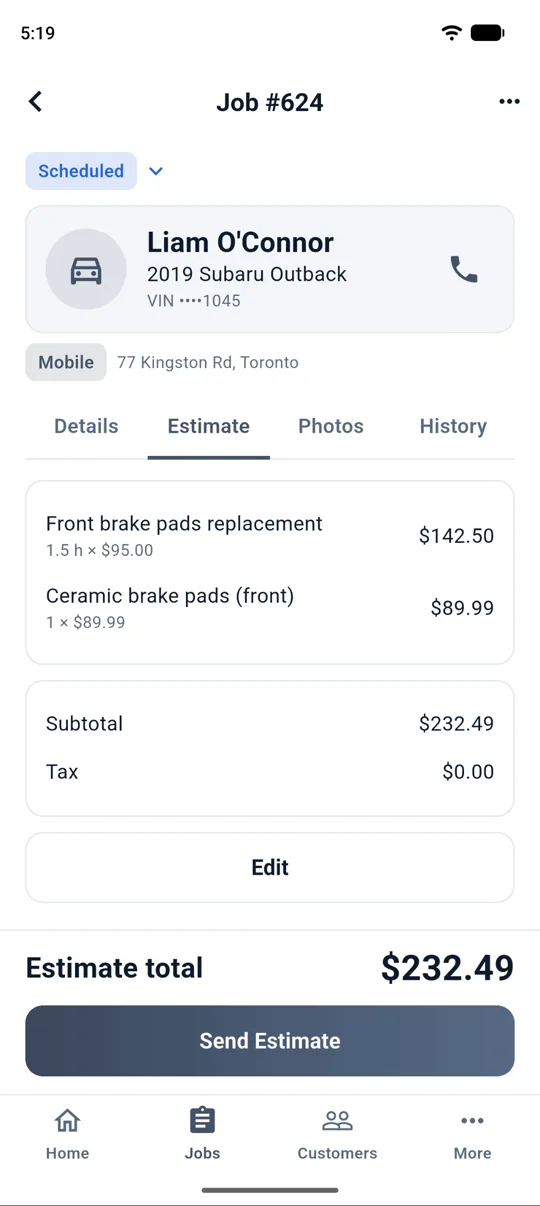
The job holds the customer, the vehicle, the problem, the estimate, photos and history. When the customer calls back next week, everything you need is one tap away.
- Garage or mobile jobs with the service address
- Quick-service chips for common work
- Status from scheduled to done
- Estimate, photos and history on every job
How to open a repair job
- 1
Pick the customer and vehicle
Choose an existing customer or add a new one. For a new vehicle, scan the VIN instead of typing it.
- 2
Describe the problem
Type what the customer told you, or tap a quick-service chip for common work like an oil change or brakes.
- 3
Garage or mobile
Choose where the work happens. For a mobile job, save the customer's address so you know where to go.
Why mechanics run jobs in AutoViko
Numbered jobs
Every job gets its own number, so you and the customer talk about the same work.
Status at a glance
See which jobs are scheduled, in progress or done without digging through paper.
History that stays
Look back at what you did on a vehicle last time before you quote the next job.
Questions
- What is a repair order?
- A repair order (or job card) is the record of a repair: who the customer is, which vehicle, what the problem is and what work was done. In AutoViko each repair job is your repair order, and it holds the estimate and invoice too.
- Can I track the status of a job?
- Yes. Every job has a status from scheduled to done, so you can see at a glance which jobs are waiting and which are finished.
- Can I create jobs for mobile work?
- Yes. Mark the job as mobile and save the service address. Garage and mobile jobs live in the same list.
Related features
Try AutoViko free for 10 days
Every feature included. $9.99/month after the trial, cancel anytime.