
Scheduling
A scheduling app for mechanics who are never at a desk
See the day and the week at a glance, book the next job in a few taps, and open the app to find today's jobs waiting on the home screen.
10-day free trial, then $9.99/month. Cancel anytime.
Your day, planned on mobile and web
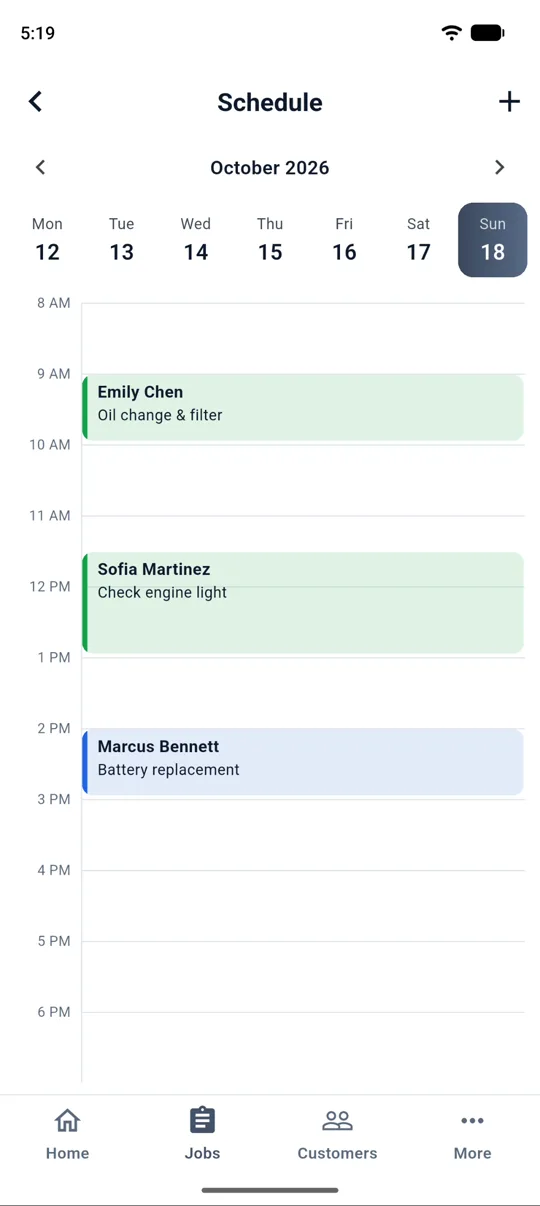
A wall calendar in the shop doesn't help when you're under a car or on the road. AutoViko keeps the schedule on your phone and on the web, with every appointment, the customer and the work in one view.
Book an appointment while the customer is on the phone, switch to the week view to find a free slot, and check today's jobs from the home screen first thing in the morning.
- Day and week view
- Today's jobs on the home screen
- Book appointments in a few taps
- Week view in the web app too
How to book a job
- 1
Find a slot
Open the schedule and check the day or week view for a free time.
- 2
Book the appointment
Pick the customer and the work. It takes a few taps.
- 3
Show up ready
On the day, the appointment is on your home screen with the customer and the job.
Why mechanics schedule in AutoViko
No double booking
See what's already booked before you promise a time.
Know the day
Today's jobs are the first thing you see when you open the app.
Phone or desk
The same schedule is in the web app, with a full week view.
Questions
- Does AutoViko have a week view?
- Yes. Switch between the day view and the week view on your phone, and the web app shows the week on a bigger screen.
- Where do I see today's jobs?
- Today's jobs show up on the AutoViko home screen, so they are the first thing you see when you open the app.
- Can I book appointments from my phone?
- Yes. Booking an appointment takes a few taps, so you can do it while the customer is still on the call.
Related features
Try AutoViko free for 10 days
Every feature included. $9.99/month after the trial, cancel anytime.